
API - Frequently asked Questions
https://cloudapi.exclaimer.com/#UpdateSubscription : This endpoint can be used to update the name and currency assigned to the subscription.
Yes.
We have a simple workaround to resolve this issue via the Exclaimer Cloud API and this can be done directly by any distributor and would not require Exclaimer support.
All they need to do is make an API call to change the subscription product tier via this existing endpoint passing this value ("Tier": "SignatureMarketingSuite") in the body to set the subscription again to the “signature tier”. This request would auto-update the subscription and set the relevant feature flags.
For reference.
- This is the endpoint to update the product tier which is the recommended workaround.
https://cloudapi.exclaimer.com/#ChangeTier - Further details on the Exclaimer Cloud API are available here
https://cloudapi.exclaimer.com/
For manual update in Alpha, here are the default feature flag for “SignatureMarketingSuite” tenant product tier;
- RotatingBanners 36
- Overrides 40
- UiAdvancedDateTime 45
- SignatureAnalytics 47
And here are the default feature flags for the feedback power ups
-
- CTMini 43
- UiFeedback 49
It’s during the #AddSubscription process a distributor can define the required trail length. Once the subscription is created, it’s still possible to extend the trial length but first the subscription needs to be deactivated and then when it’s reactivated, the distributor can specify to reactivate the subscription with the “InTrial” set to “true” in the body of the API call and the system will reactivate the subscription with the same number of days the subscription was previously set.
- This is the endpoint to deactivate the subscription.
https://cloudapi.exclaimer.com/#DeactivateSubscription - This is the endpoint to reactivate the subscription.
https://cloudapi.exclaimer.com/#ReactivateSubscription
Note that this value { "InTrial": true } needs to be specified in the body of the above API call to ensure it’s reactivated as trial.
Billable users count + overage count is what we will use for billing.
The quantity you pass to Exclaimer initially as mailbox count when you add a subscription is always shown to you as number of users in the Exclaimer Cloud API get subscription(s) call. Overage is only displayed for subscriptions where the unique imprinted signatures exceeds the value you initially told us for the mailbox count.
From a billing side,
- Subscriptions without an overage, you are billed for the value of B
- Subscription with overage, you are billed for the value of B+C
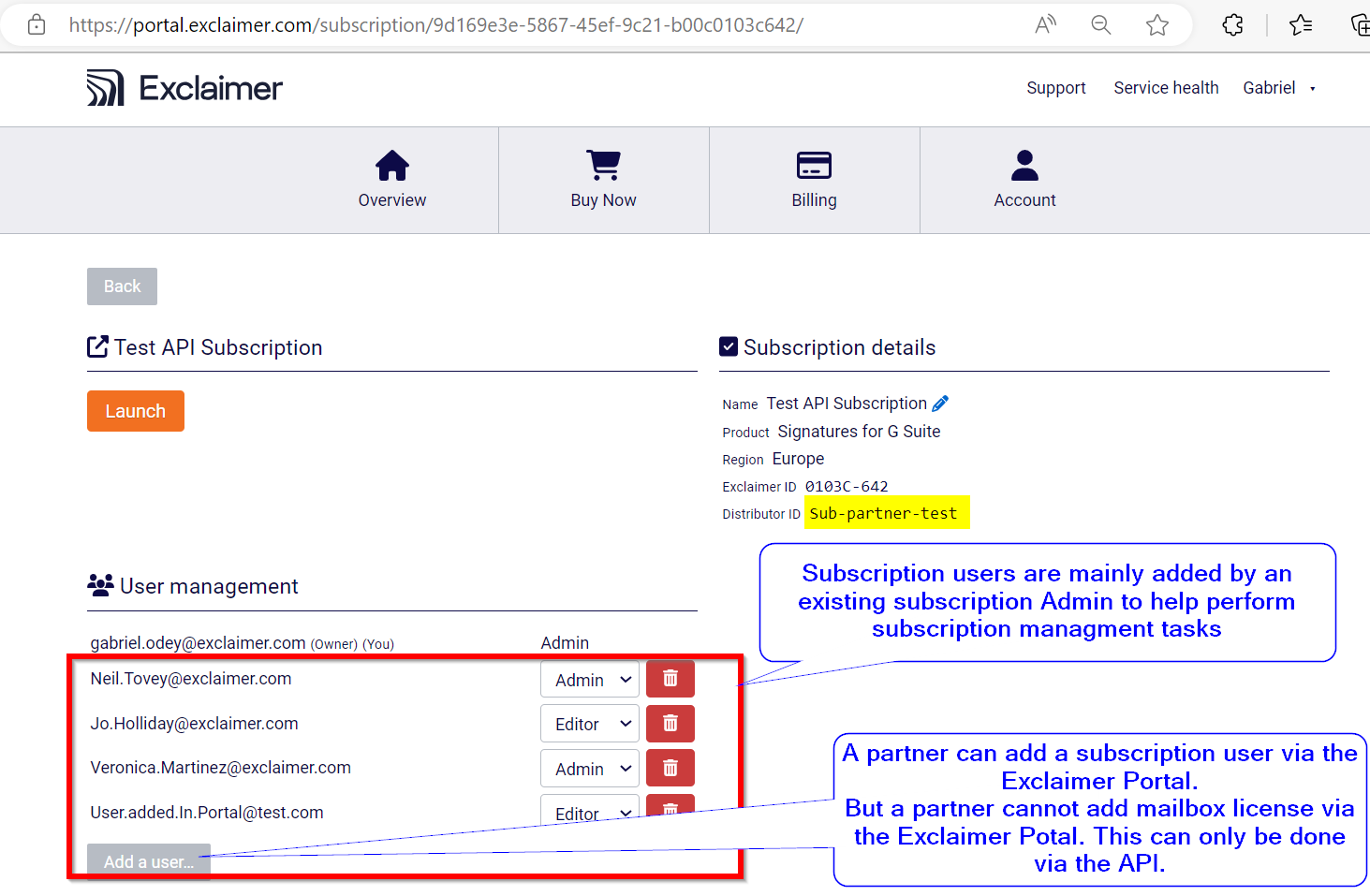
Subscription users: are the users who are added to the subscription to perform subscription management tasks. These users can be added via the Exclaimer portal or via the Exclaimer Cloud API.
Mailbox license: These are the number of mailbox license/number of users an API distributor buy. This can only be purchased from the Exclaimer cloud API. A view of the Exclaimer Portal Subscription management page:
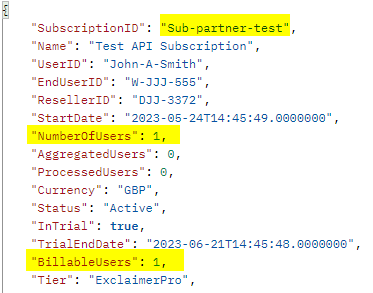
A view of the above subscription from the Exclaimer Cloud API:
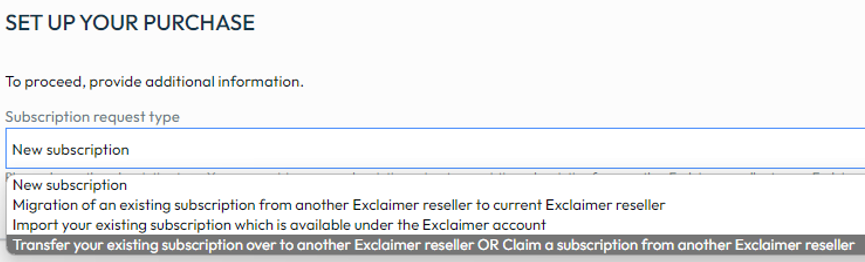
- New Subscription: This option is designed to facilitate the creation of a new subscription.
- Migration of Existing Subscription: This process involves the transfer of a subscription from one channel to another, requiring the involvement of an Exclaimer admin to execute the move. In the background, an email is sent to the Exclaimer partner team, requesting the direct Exclaimer partner subscription to be moved over to a distributor.
- Transfer/Claim Subscription: A novel feature in Connect that automates the movement of subscriptions between Exclaimer API distribution partners. For instance, if an Exclaimer API distributor A wishes to migrate a subscription over to an Exclaimer API distributor B, or vice versa, this functionality enables a seamless transfer of subscriptions between Exclaimer API distribution partners without requiring direct support from Exclaimer.
- Import Your Existing Subscription: This functionality exists to support the bulk approval of subscriptions, ensuring they become visible and manageable in Connect.
It is important to emphasize that all the aforementioned options are in place to provide API partners in the CloudBlue ecosystem with robust functionality and flexibility. Notably, the existing functionalities remain unchanged; the only addition is option number 3 (Transfer/Claim Subscriptions).
- New: This is for setting up a new subscription, either with an existing or a new Exclaimer reseller.
- Migration: Migration initiates a request in Connect but doesn't automate any actions on the Exclaimer side. Instead, an email is sent to Exclaimer to handle the migration manually, moving a subscription from one reseller to another.
- Import: Importing allows you to bring in a subscription to Commerce that's already associated with a reseller on the Exclaimer side but hasn't been visible in Commerce. This is useful for resellers with existing Exclaimer subscriptions who've recently started using Commerce for billing.
- Transfer: Choose this option to move an existing subscription to another Exclaimer reseller or claim a subscription from another Exclaimer reseller. To proceed, you'll need to input a transfer token received from the other reseller.
In our efforts to provide a consistent experience for customers, whether purchasing through CloudBlue or the Microsoft Marketplace, we've aligned the back-end behavior to mirror what a direct customer encounters.
After a successful subscription order, the system will promptly send a welcome message to the subscription owner. This message contains all the necessary information to access and configure the subscription within the Exclaimer Portal.
Distributor Partner A has “Demo Customer”
Demo Customer wants to move all their services away from Distributor Partner A to Distributor Partner B.
Does your API allow for us to get a customers details via API and move them from one partner to another, when they are both under the Distributor ?
With this endpoint, the distributor has the capability to assign, transfer, or remove a reseller and/or end user from an existing subscription. Please review the documentation for a more comprehensive understanding of its features.
- Visit the following link: Initiate Subscription Transfer
Please note:
- CloudBlue does not have a method to generate a transfer token. We only have a method to claim a subscription using a transfer token provided by the subscription owner.
- If you prefer not to use the "Transfer" option, you can utilize the "Change Of Channel" process instead.
For further assistance or inquiries, please don't hesitate to reach out to our support team.
- Add Asset ID (AS-XXX-XXX-XXX) of each subscription that requires offline cancellation in the configuration parameter of the product (on the right marketplace filter) comma separated. This can be done by the distributor but also by the vendor.
- Cancel subscription. It should process it with offline cancellation and also notify in the request of the cancellation.
- Remove the AS ID from the configuration parameter.
To ensure a smooth transition when managing subscription users and ownership, please follow these steps in the specified order:
Step 1: Assign Admin Role
A. For New Users:
- Add the New Subscription User:
- Use the following endpoint to add a new subscription user.
- Ensure the new subscription user is assigned the admin role "Admin".
- Add Subscription User
B. For Existing Users:
Update User Role to Admin:
Use the following endpoint to update the existing subscription user to have the admin role.
Update Subscription User Roles
Step 2: Change Subscription Owner
- Assign Admin Role:
- Confirm that the intended email address has been assigned the admin role.
- Update Subscription Owner:
- Once the admin role is assigned, proceed to update the subscription owner from the current owner to the new admin.
- Change Subscription Owner
On completion of the above steps, the new subscription owner will receive an email notification allowing them access to the subscription on the Exclaimer portal.
When managing your Exclaimer subscription, you will encounter several key terms related to user counts. Here is a breakdown of each term:
NumberOfUsers
This is the number of "MailboxCount" (mailbox licenses) that a distributor requests from Exclaimer during the Add Subscriptions API request.
AggregatedUsers
This is the total number of users visible in a distributor's Azure Active Directory or Google Directory.
ProcessedUsers
This is the total number of users that are routed through Exclaimer. Note that not all of these users might receive a signature.
BillableUsers
- This is the total number of unique mailboxes that a customer should be paying for. Often, this count is the same as the “NumberOfUsers”.
- The ”BillableUsers” count plus any “Overage” (if applicable) constitutes the total amount of licenses a customer is billed for monthly.
- The existing Exclaimer Cloud API endpoint now supports filtering to display only subscriptions with overages.
- The #GetSubscriptions endpoint supports a new filter overageOnly=true to filter subscriptions with overages, including all subscription statuses (Active, Suspended, Cancelled, Ended).
- The new filter overageOnly=true also works with the existing filter activeOnly=true to filter active subscriptions.